How OpenAI built Codex: inside the agent loop and harness
OpenAI's Codex powers a cross-platform coding agent (CLI, web, VS Code, macOS app) from a single shared harness. Two engineering posts reveal exactly how that harness works: the agent loop that orchestrates model inference and tool calls, the prompt structure and caching strategy that keeps it efficient, and the App Server JSON-RPC protocol that lets every client surface share the same core.
Ready to ace your system design interview?
This article is just one piece. SWE Quiz gives you structured, interview-focused practice across every topic that comes up in senior engineering rounds.
- 1,000+ quiz questions across system design and ML/AI
- Spaced repetition to lock in what you learn
- Full case study walkthroughs of real interview topics
- Track streaks, XP, and progress over time
TL;DR
- Every Codex surface (CLI, web, VS Code, macOS) runs the same "Codex harness" — the shared agent loop, thread lifecycle, tool execution, and auth logic — so features ship once and work everywhere.
- The agent loop sends HTTP requests to the Responses API, building an ever-growing JSON prompt from system instructions, tool definitions, sandbox permissions, and conversation history.
- Prompt caching is critical for efficiency: static content (instructions, tools) lives at the front of the prompt so each new turn gets a cache hit on all prior context. Tool ordering bugs cause expensive cache misses.
- When the context window fills, Codex calls a /responses/compact endpoint that returns an opaque encrypted_content item encoding the model's latent understanding — smaller than a text summary and privacy-preserving.
- The App Server is a JSON-RPC protocol over stdio exposing Codex core to any client. Three primitives power the protocol: Item (atomic I/O with a lifecycle), Turn (one unit of agent work), and Thread (persistent conversation container).
Why this matters for interviews
Agent architecture is becoming a standard system design topic. This post gives you concrete production patterns: how tool calls are orchestrated, how context is managed at scale, and how to design a stable protocol that decouples a complex agent runtime from multiple client surfaces.
Breakdown
1.One harness, many surfaces
Codex ships as a CLI, a web app, a VS Code extension, and a macOS desktop app. Despite looking different, they all run the same "Codex harness" — a shared Rust library called Codex core that contains the agent loop, thread lifecycle (create/resume/fork/archive), config and auth management, and sandboxed tool execution.
The harness is not just a module you call once; it's a runtime you spin up, and it manages the full lifecycle of one conversation thread, including persisting the event history so clients can reconnect and render a consistent timeline.
The App Server is the stable protocol that exposes this runtime to any client, regardless of language or platform.
Interview angle: This is a textbook platform extraction story. Interviewers often ask how you'd serve multiple clients (mobile, web, desktop) from one backend.
The key insight here is that you don't just expose an API — you define a protocol with a well-typed event stream. That lets you decouple client release cycles from server improvements, which is exactly how Xcode pins to a stable client while updating the App Server binary independently.
2.The agent loop: inference, tool calls, repeat
At the core of every AI agent is the agent loop. In Codex, it works like this: (1) build a prompt from the current conversation state; (2) send it to the Responses API and receive a stream of Server-Sent Events; (3) if the model requests a tool call (e.g., "run ls"), execute it and append the result to the prompt; (4) re-query the model with the updated prompt; (5) repeat until the model emits an assistant message instead of a tool call.
That final assistant message — something like "I added architecture.md" — signals the end of one turn. Each loop iteration can involve many inference/tool-call cycles.
The prompt grows with each round trip because the full conversation history must be included in every request for the model to have context. This makes the loop technically O(n²) in bytes sent over the course of a conversation, which is why caching and compaction are non-negotiable.
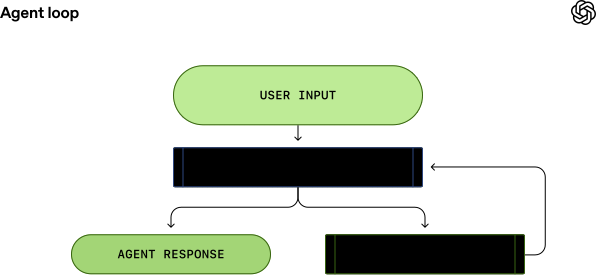
Interview angle: The agent loop is the foundation of any LLM agent interview answer. Know that it's not just "call the model once" — the key complexity is managing the growing context across many tool-call iterations.
The interview follow-up is almost always "what happens when you hit the context limit?" — the answer is compaction, covered later.
3.Building the initial prompt
When Codex starts a conversation, it constructs a structured JSON payload for the Responses API with three fields: instructions (a system/developer message with model-specific guidance, e.g., gpt-5.2-codex_prompt.md), tools (a list of tool definitions including the shell tool, the update_plan tool, web search, and any MCP tools the user configured), and input (an ordered list of messages).
The input is built in a specific order: first a developer message describing sandbox permissions and which folders Codex can write to; optionally a developer message with the user's personal config from ~/.codex/config.toml; optionally a user message aggregating AGENTS.md files found from the git root up to the current working directory; a user message with the current environment context (cwd and shell); and finally the actual user message.
The role hierarchy — system > developer > user > assistant — determines how the model weights each piece of content. Critically, static content (instructions, tools) comes first so prompt caching can work.
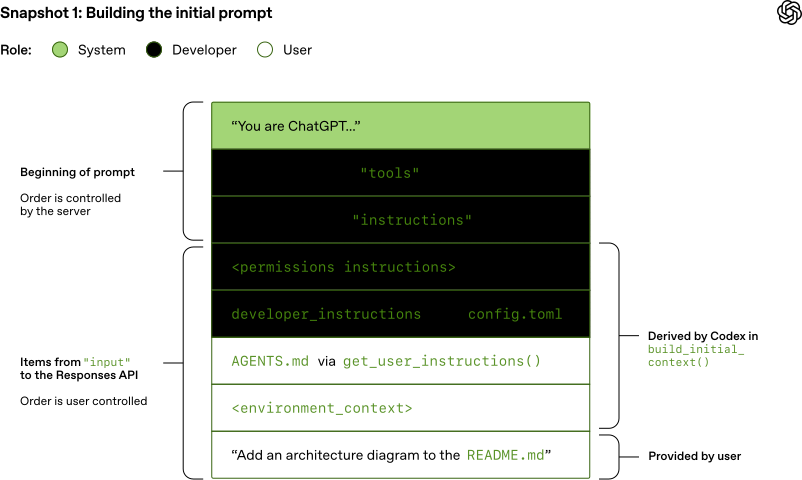
Interview angle: Prompt structure is a systems problem, not just a prompt engineering problem. Interviewers testing agent design will ask: how do you inject context without blowing up the prompt, and how do you keep it cacheable?
The answer: layer messages by stability — the most static things go first (system instructions), the most dynamic things go last (user message). This maximizes cache hit rate on every turn.
4.Prompt caching: making the loop efficient
LLM inference is expensive because the model must process every input token on every call. Prompt caching lets the server reuse computation from a previous call when the new prompt shares an exact prefix with a cached one.
Because Codex appends to the prompt rather than rebuilding it, each new turn automatically shares a prefix with the previous call — so caching delivers near-linear cost instead of quadratic. But cache hits only happen for exact prefix matches, so anything that changes earlier in the prompt poisons the cache for everything after it.
Codex guards against this carefully: if the sandbox configuration changes mid-conversation, a new developer message is appended at the end (not inserted earlier). If the cwd changes, a new environment_context message is appended. The team also found that MCP tools had a subtle bug where tool definitions were emitted in non-deterministic order, causing cache misses on every turn until fixed.
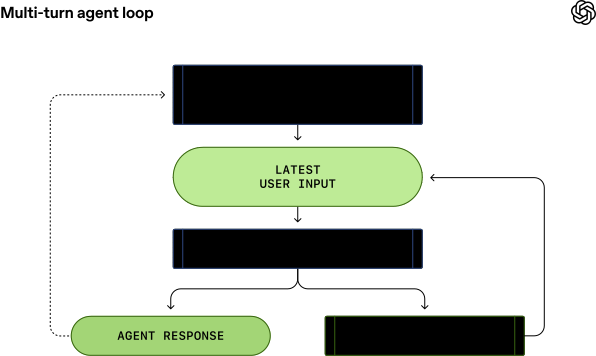
Interview angle: Caching as a correctness constraint, not just a perf optimization, is a strong interview signal. The concrete question is: given that you must send the full conversation history each time, how do you avoid O(n²) cost?
The answer — maintain a stable prefix, append-only history, and use server-side prefix caching — directly maps to how Redis, CDNs, and SQL query caches all work. You can draw the same analogy in interviews.
5.Context window management: compaction
Every model has a finite context window — the maximum number of tokens for one inference call, counting both input and output. In a long agentic session with many tool calls, the conversation history can easily exhaust this limit. Codex solves this with compaction.
Originally, users had to manually run /compact, which summarized the conversation into a short text. Now Codex calls a dedicated /responses/compact endpoint when the token count exceeds auto_compact_limit.
This endpoint returns a new, smaller list of input items that represents the conversation. Crucially, this list includes a special type=compaction item containing an opaque encrypted_content blob that encodes the model's latent understanding of everything that happened — richer than any text summary. For Zero Data Retention customers, OpenAI keeps the decryption key (not the data), so the model's reasoning is preserved without storing conversation content in plain text.
Interview angle: Context window management will come up any time you discuss production LLM systems.
Know the three levers: (1) summarization (cheap, lossy), (2) selective truncation (drop old messages, risky), (3) model-native compaction like Codex uses (preserves latent state, best quality).
The ZDR angle is also worth knowing — "how do you do compaction without retaining user data?" is a real enterprise requirement.
6.The App Server: a stable client protocol
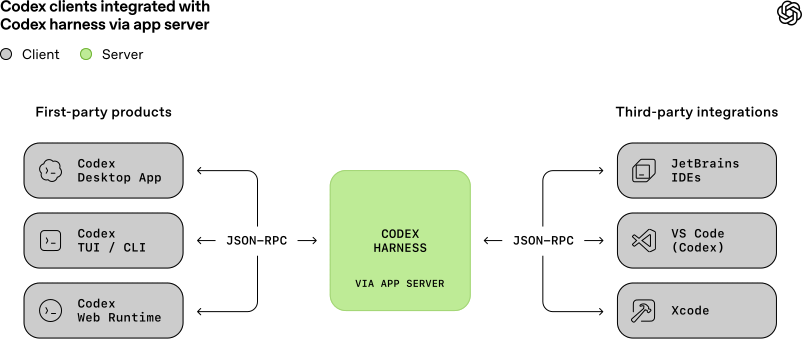
The App Server is a long-lived process that hosts Codex core threads and exposes them over a bidirectional JSON-RPC protocol (JSONL over stdio). It has four internal components: a stdio reader (transport layer), a Codex message processor (translates JSON-RPC requests into Codex core operations and transforms low-level internal events into stable UI-ready notifications), a thread manager (one core session per thread), and the core threads themselves.
The protocol was born out of necessity: when the VS Code extension was built, the team tried using MCP to expose the agent but found MCP semantics couldn't represent rich session state like diffs and streaming progress. They designed a custom JSON-RPC protocol instead.
As internal teams and partners (JetBrains, Xcode) wanted to embed Codex, it became the official surface. The design goal was backward compatibility — older clients can talk to newer App Server binaries safely, so partners can update server-side without waiting for a client release.
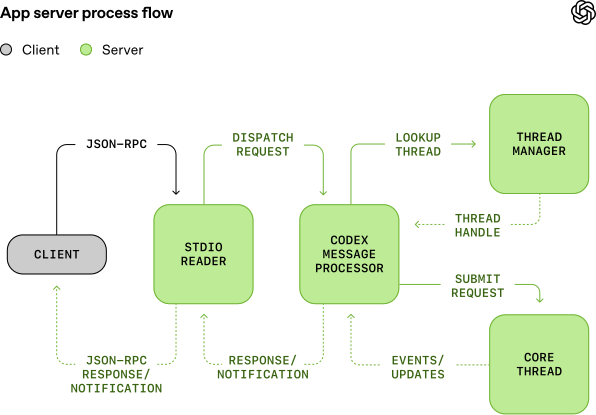
Interview angle: Designing a stable protocol for a complex stateful system is a recurring system design problem.
The pattern here is: (1) define a small set of well-typed primitives with explicit lifecycles; (2) make the protocol backward compatible so clients and servers can be deployed independently; (3) use a transport (stdio/JSONL) that works across languages.
The tradeoff versus REST is that you get bidirectional streaming but require clients to speak JSON-RPC.
7.Conversation primitives: Item, Turn, Thread
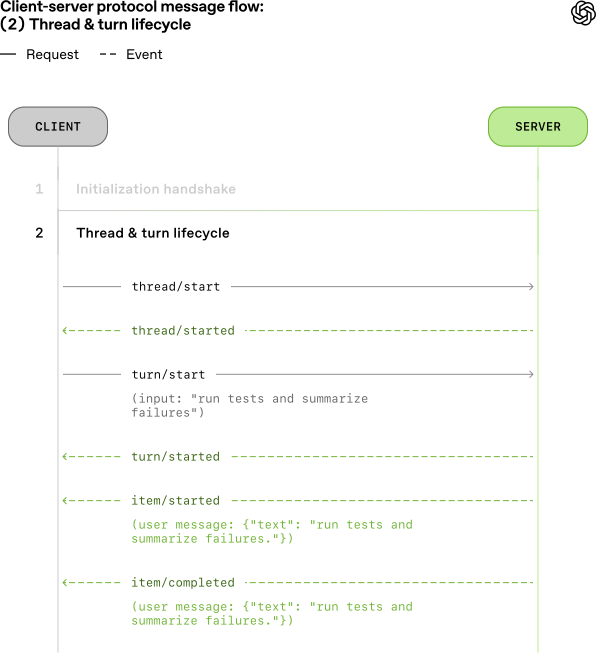
The App Server protocol is built on three primitives.
An Item is the atomic unit of input/output — typed (user message, agent message, tool execution, approval request, diff) with an explicit lifecycle: item/started fires when the item begins, optional item/*/delta events stream in content incrementally, and item/completed fires with the terminal payload. This lets clients render UI immediately on started without waiting for the full content.
A Turn is one unit of agent work: it begins when the client submits input and ends when the agent finishes all outputs for that input. A Turn contains a sequence of Items representing intermediate steps.
A Thread is the durable container for an ongoing session: it holds multiple turns, persists event history to disk, and can be resumed after a disconnect. The server can also pause a turn mid-execution by sending an approval request to the client — the agent waits until the client responds allow or deny before continuing.
Interview angle: Defining primitives with explicit lifecycles is a pattern that shows up in streaming API design generally (think WebSockets, SSE, gRPC streams).
The key interview insight: rather than returning a single response, you emit a stream of typed events with lifecycle markers. This makes partial rendering, error recovery, and audit logging all much easier to implement.
The approval/pause mechanism is also worth discussing — it's how you make an autonomous agent safely interruptible.
8.Client integrations: local, web, and beyond
Different surfaces integrate with the App Server in different ways. Local clients (VS Code, macOS desktop) bundle a platform-specific App Server binary, launch it as a child process, and keep a bidirectional stdio channel open. The shipped binary is pinned to a tested version, but partners like Xcode can decouple their release cycle by pointing to a newer binary when needed.
Codex Web runs the App Server inside a provisioned container — a worker checks out the workspace, launches the App Server binary, and maintains a JSON-RPC channel; the browser talks to the backend over HTTP+SSE. This means the agent keeps running even if the browser tab closes, and a reconnecting session can catch up from the persisted thread history.
The CLI's TUI historically ran in the same process as the agent loop (no protocol layer), but the team plans to refactor it to use the App Server too, which would enable connecting the TUI to a remote agent session.
Interview angle: The web vs. local integration is a classic "where does state live?" problem. If you run the agent in the browser tab, the tab closing kills the session. If you run it server-side, you get persistence but need a reconnect mechanism.
The Codex answer — run server-side, stream events over SSE, persist thread history — is exactly how you'd design any long-running job system (think CI pipelines, batch processing, or async workflows).
Key Concepts
Agent loop
The core orchestration cycle in an AI agent: build a prompt, query the model, execute any tool calls the model requests, append results to the prompt, and repeat until the model returns a final assistant message.
Analogy: Think of it like a while loop in code: the exit condition is the model saying "I'm done," and each iteration adds more context to a shared scratchpad.
Responses API
OpenAI's server API that Codex uses for model inference. It accepts a JSON payload with instructions, tool definitions, and an input list, then returns a Server-Sent Events stream of typed response events.
Prompt caching
A server-side optimization where the model reuses computation from a previous inference call when the new prompt shares an exact prefix with a cached one. Only works if the prompt is append-only and static content comes first.
Analogy: Like a CDN cache: if the URL (prefix) matches exactly, you get the cached response instantly. Any change to an earlier part of the URL busts the cache for everything after it.
Compaction
The process of replacing a long conversation history with a shorter, semantically equivalent representation when the context window limit approaches. The /responses/compact endpoint returns an opaque encrypted_content item that preserves the model's latent understanding.
Codex core
The Rust library and runtime that contains all agent logic: the agent loop, thread lifecycle management, configuration and auth, and sandboxed tool execution. It is the implementation shared across all Codex surfaces.
App Server
A long-lived process that hosts Codex core threads and exposes them to clients via a bidirectional JSON-RPC protocol over stdio. It acts as both the transport layer and the translation layer between client requests and low-level agent events.
Item (App Server primitive)
The atomic unit of input/output in the App Server protocol. Each item has a type (message, tool call, diff, approval request) and an explicit lifecycle: started, optional delta stream, then completed.
Turn (App Server primitive)
One unit of agent work initiated by a single user input. A turn begins when the client submits a message and ends when the agent finishes producing all outputs, potentially after many model inference/tool-call cycles.
Thread (App Server primitive)
The durable container for an ongoing Codex session. A thread holds multiple turns, persists event history so clients can reconnect, and supports operations like create, resume, fork, and archive.
Zero Data Retention (ZDR)
A configuration where the provider does not store conversation data. Codex supports ZDR by keeping requests stateless (no previous_response_id) and by encrypting reasoning content — the provider stores the decryption key, not the data.
Knowledge Check
10 questions — your answers are saved locally so you can come back anytime.